A regional credit union wanted to move from Snow into a more actionable ServiceNow software asset management model, but the real requirement was bigger than a platform swap. Leadership needed a live ServiceNow implementation that could load entitlements, track SaaS products, support reclamation, and give the software asset management team usable reporting without waiting for a long custom-build cycle.
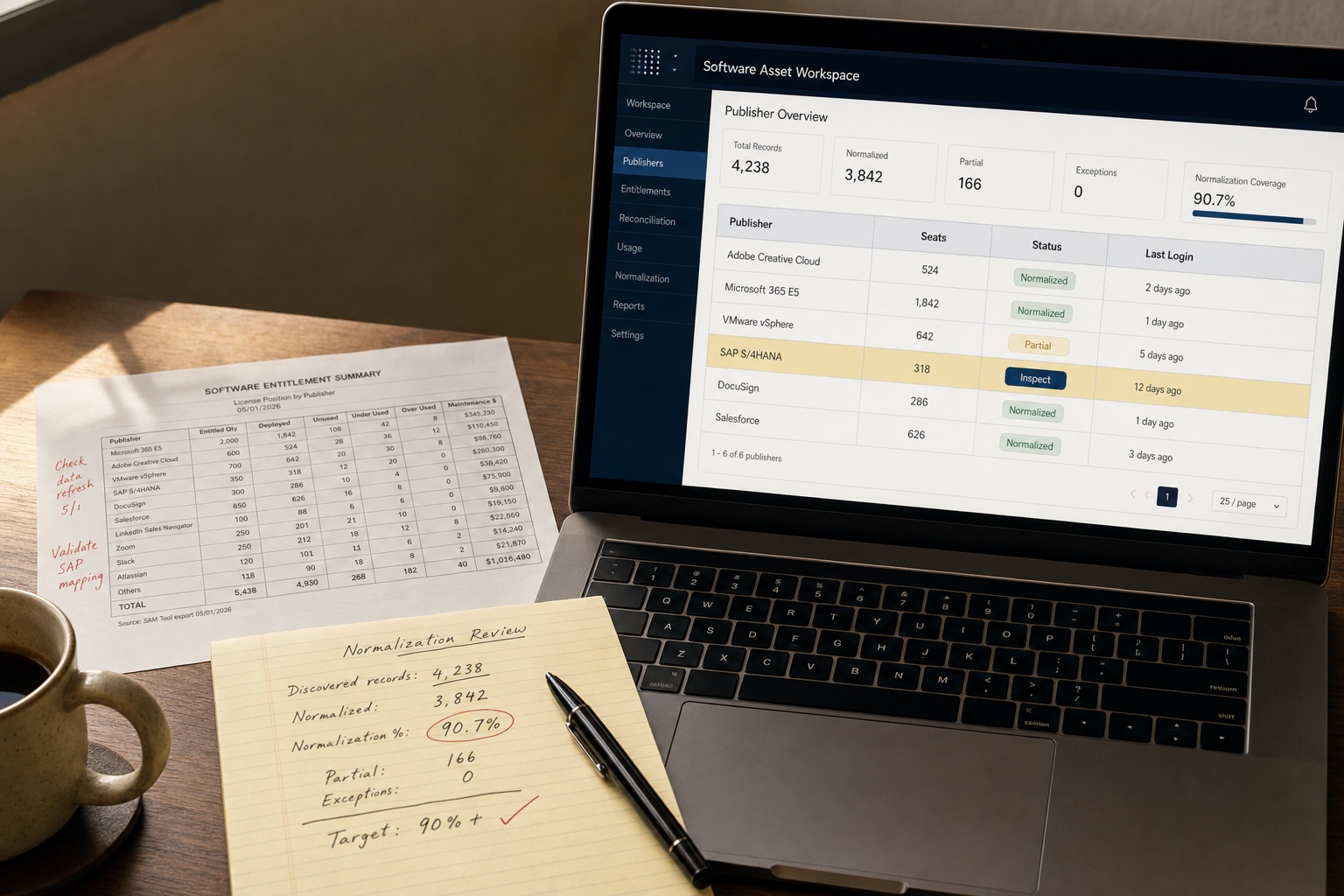
UMS supported the rollout through CDW using an accelerated ServiceNow SAM Pro delivery model. The scope covered 22 named implementation stories across plugin activation, normalization, entitlement loading, SaaS integrations, reclamation, reporting, testing, and handoff. By post-go-live training, the environment was showing 90%+ normalization across more than 4,000 discovered software records, with 166 only partially normalized and no red exceptions called out in the training review.
The result was a working SAM Pro foundation the credit union could operate, not a slide deck that still required the internal team to figure out how the workflows were supposed to run.
The Challenge
The client was not starting from zero. It already had asset-management processes and existing tooling, but it wanted to transition from Snow into ServiceNow SAM Pro without losing momentum on entitlement management, usage visibility, and future governance. That created several pressure points at once:
- Tool transition risk - Replacing a legacy SAM workflow is easy to underestimate. The client needed to stand up new plugins, publisher packs, normalization services, and SaaS connectors while still keeping the environment credible for day-to-day asset management.
- Multi-vendor entitlement complexity - The target scope was not limited to one vendor. The Definition of Success included entitlement loading and reconciliation for Microsoft, VMware, Adobe, and SAP, plus SaaS-specific setup for DocuSign, Salesforce, and Microsoft 365 subscription data.
- Data-quality dependence - ServiceNow SAM Pro only becomes operational when discovery and entitlement data are normalized well enough to trust the outputs. If normalization stays weak, reclamation, reconciliation, and reporting all degrade with it.
- Operational handoff requirements - The internal team did not just need a configured platform. They needed train-the-trainer sessions, administrator knowledge transfer, custom reporting, and a go-live support plan they could actually use after the project closed.
For a regulated financial institution, this kind of implementation cannot stop at “the module is installed.” It has to create a durable software asset management operating rhythm.
How UMS Solved It
UMS structured the rollout around a practical Definition of Success instead of generic ServiceNow setup tasks.
Step 1: Translate the implementation into an outcome-based scope The June 23, 2022 Definition of Success documented 22 stories tied to concrete acceptance criteria. That mattered because it forced the project to define what “working” meant before the build accelerated. The stories covered core SAM Pro activation, publisher packs, data normalization, SaaS license management, spend imports, custom fields, custom reports, and go-live readiness rather than treating those as vague future enhancements.
By the states recorded in that file, 20 stories were marked Ready and 2 were Awaiting Customer, which gives a much clearer picture of delivery maturity than a generic percentage-complete status line.
Step 2: Build the data foundation before chasing dashboards UMS and CDW first activated the underlying ServiceNow capabilities the client would need to trust the platform:
| Foundation Area | What Was Put in Place | Why It Mattered |
|---|---|---|
| Core SAM Pro stack | SAM Pro, workspace, SCCM usage, SaaS integrations, spend detection, predictive intelligence, and related plugins | Turned the instance into a real SAM operating surface |
| Content and normalization | Data Normalization Service, Central Content Services, and machine-learning normalization | Improved software model quality so reconciliation outputs were usable |
| Publisher coverage | Adobe, Citrix, IBM, Microsoft, Oracle, SAP, VMware, and engineering-app publisher packs | Extended the platform beyond a narrow single-vendor deployment |
This sequence is important. A SAM program that starts with executive dashboards but skimps on normalization usually produces numbers that no one wants to act on.
Step 3: Load entitlements, usage, and SaaS data across the real estate Once the foundation was live, the team moved into the operational data flows. The scoped stories included entitlement loading and reconciliation for Microsoft, VMware, Adobe, and SAP; SaaS entitlement configuration for DocuSign and Salesforce; Microsoft 365 subscription management; SCCM usage validation; and spend-transaction imports covering the prior three years.
The train-the-trainer session shows what this looked like in practice. The team discussed handling 25 Microsoft entitlements, software transaction imports, normalization monitoring, and the cadence an internal software asset manager would need to review reconciliation, renewal timing, reporting, and exceptions. That is the difference between a technical deployment and an operating model.
Step 4: Turn the environment into something the client could run UMS also addressed the workflows that usually determine whether a SAM implementation survives after launch:
- Five reclamation rules were configured to identify reclaim opportunities from usage patterns.
- Custom reports were included to track portfolio-management progress, including a customized NCUA-oriented report called out positively in the post-project review.
- Administrator and trainer handoff were built into the plan through recorded knowledge transfer, a train-the-trainer session, artifacts, and a go-live checklist.
- Critical care support was defined for the first five days after production release so mission-critical issues had an owned support path.
The closeout materials reinforce that handoff mattered. In the post-project review, the client team specifically highlighted the custom reporting work, support on ServiceNow Discovery and Microsoft SCCM for SAM, and assistance on the custom SaaS integration as things that worked well.
Results
| Metric | Before | After | Impact |
|---|---|---|---|
| SAM operating model | Snow-era process and no live SAM Pro foundation in ServiceNow | 22 scoped ServiceNow SAM Pro stories with 20 marked Ready in the project success document | Structured transition into a usable ServiceNow SAM environment |
| Data quality | Normalization quality had to be proven before outputs could be trusted | 90%+ normalization across 4,000+ discovered software records, with 166 partially normalized and no red exceptions discussed in handoff training | Platform outputs were credible enough to operate from |
| Multi-vendor coverage | Entitlements and SaaS workflows spread across separate manual efforts | Microsoft, VMware, Adobe, SAP, DocuSign, Salesforce, Microsoft 365, and spend imports brought into the scoped SAM program | One platform strategy across major software domains |
| Reclamation and reporting | No active SAM Pro reclaim workflow or custom reporting baseline | 5 reclamation rules, custom reports, and NCUA-oriented reporting support | Operational governance, not just technical setup |
The biggest outcome was readiness. The implementation gave the client a ServiceNow SAM Pro environment with enough normalized data, configured workflows, and transferred knowledge to support recurring asset-management work after go-live.
Key insight: A ServiceNow SAM Pro rollout creates value when it turns software data into an operating system for entitlement, usage, and renewal decisions. If the project ends at plugin activation, the organization is still stuck doing SAM manually.
Additional Outcomes
- The client team received practical run-state guidance - The training session walked through daily, weekly, monthly, and yearly responsibilities for a software asset manager instead of treating the handoff as a one-time demo.
- Normalization became a monitored process, not a black box - The post-go-live review explicitly covered how to watch partial-normalization counts, content-service refreshes, and exception handling.
- Go-live was supported as a managed release - The project included a formal checklist, user-acceptance-testing structure, recorded admin knowledge transfer, and five days of post-production critical care.
For organizations moving from a legacy SAM workflow into ServiceNow, that is the repeatable lesson. The implementation succeeds when the platform, data, and operating cadence all go live together.